
.avif)

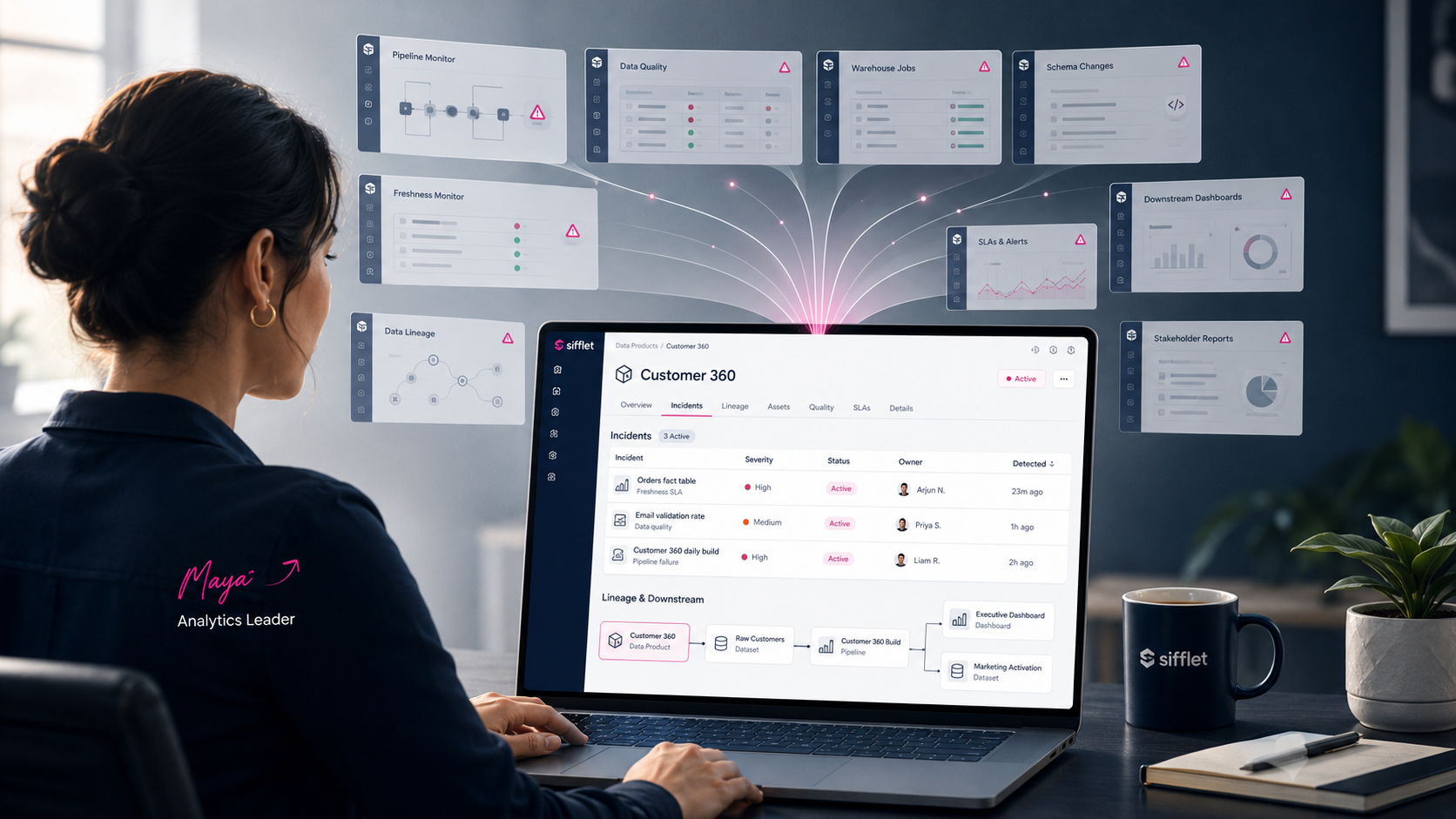
Every morning at 8:30, Maya — the head of analytics at a B2B SaaS company — opens her laptop and runs through the same ritual. The Customer 360 model her team owns powers four downstream dashboards and a churn-prediction pipeline. To know whether her data product is healthy, she clicks through eight different monitor pages, mentally maps which assets belong to her product, and reconciles the answers in her head. By the time she's done, the executive standup has started.
This is the gap that Data Product Incident Visibility is designed to close.
What is Data Product Incident Visibility?
Data Product Incident Visibility is a Sifflet feature that lets users view every incident affecting a specific Data Product in a single dedicated list. From that list, any incident opens directly into the full Incident Overview page, with lineage, owner, and resolution context attached.
The update reframes Data Products from a conceptual layer in the data catalog into an operational, observable unit. Until now, the Data Product abstraction was a useful organizing principle but not an accountable one. With this release, every Data Product page becomes a status board for the assets and pipelines that comprise it.
What is a Data Product in Sifflet?
A Data Product in Sifflet is a curated set of datasets, dashboards, or pipelines that delivers a defined value to a business consumer. Examples include a customer 360 model, a marketing attribution table, a revenue forecast dashboard, or the feature store powering a recommendation system.
Treating data as a product means giving it owners, SLAs, and quality expectations. Until this release, those expectations were difficult to track because incidents lived alongside individual assets, not Data Products themselves. The Data Product owner had to manually map upstream failures back to the product they cared about.
How Data Product Incident Visibility works
Each Data Product page in Sifflet now includes an Incidents section. The section lists every active and recent incident affecting any asset inside the product.
- Filter by status, severity, or owner — so an SRE rotation can scope to active high-severity issues only
- Sort by detection time or incident type — to see what just broke versus what's been simmering
- Click through to the standard Incident Overview for triage, with full lineage from source to consumer
The list updates in real time. When a freshness or volume monitor on any underlying table fires, the Data Product surface reflects it immediately. No manual reconciliation, no mental mapping.
Why product-level visibility matters
Most data observability platforms organize incidents by table or pipeline. That works for the platform team but fails the business owner who only cares about whether their product is healthy.
Product-level visibility flips the lens. The Data Product owner sees a single, focused incident list scoped to their domain — without sifting through unrelated noise from elsewhere in the warehouse.
Asset-level vs. product-level views: a comparison
ViewBest forLimitationAsset-level incidentsPlatform engineers triaging individual tablesNo clear roll-up to business outcomesPipeline-level incidentsData engineers responsible for ETL reliabilityMisses dashboard and ML asset failuresData Product incidentsProduct owners and consumers tracking SLAsRequires Data Products to be defined first
Maya's morning, after the upgrade
Back to Maya. After enabling Data Product Incident Visibility, her morning ritual collapsed from eight clicks to one. She bookmarked the Customer 360 product page and made it the first thing she opens after coffee.
Three concrete things changed in her week:
- The 8:30 standup ran on time again. Maya reported product health from a single page instead of reconstructing it from monitor logs.
- When the marketing team asked whether the attribution data was reliable for their campaign launch, Maya pointed them to their own Data Product page — and they answered the question themselves.
- An incident affecting an upstream Salesforce sync that had been silently degrading the product for two weeks finally surfaced. The asset-level monitor had been firing the whole time; the rollup made it impossible to ignore.
Operational impact for data teams
For teams adopting a data-as-a-product model, this update unlocks three concrete workflows that previously required tribal knowledge.
SLA reporting. Owners can pull the incident list for any time window and report against agreed-upon reliability targets — without writing custom queries against incident metadata.
Faster incident routing. Triagers no longer need to mentally map a failing asset back to its parent product. The product page already shows everything affected, with the right owner attached.
Cross-team accountability. Consumers can subscribe to a Data Product and see exactly what is breaking it, instead of asking the data team for status updates and waiting hours for a response.
Getting started
Data Product Incident Visibility is available now to all Sifflet customers. Open any existing Data Product in Sifflet and switch to the Incidents tab to see the live list.
Teams that have not yet defined Data Products can do so from the Data Products section. Once a product is defined — by listing the datasets, dashboards, and pipelines that comprise it — every incident affecting any underlying asset rolls up automatically. No extra configuration required.
For teams operating at the intersection of data quality and business outcomes, this update reframes Data Products as living, observable entities. Maya's morning is the proof: when reliability work scales with the product, not the asset, the right people see the right problems at the right time.
.avif)

















-p-500.png)
