
.avif)

It's 3 a.m. when Brian, the on-call data engineer for a fast-growing marketplace, gets paged for the fourth time this week. Each alert lands in a different Slack channel. Each one references a different monitor. Two of them turn out to be the same incident, traced from different angles. By the time Brian pieces it all together, his team has lost 40 minutes of recovery time and the morning standup is a blur.
This is the alerting problem at scale — and it's the problem Sifflet's new notification rules are designed to solve.
What are notification rules in Sifflet?
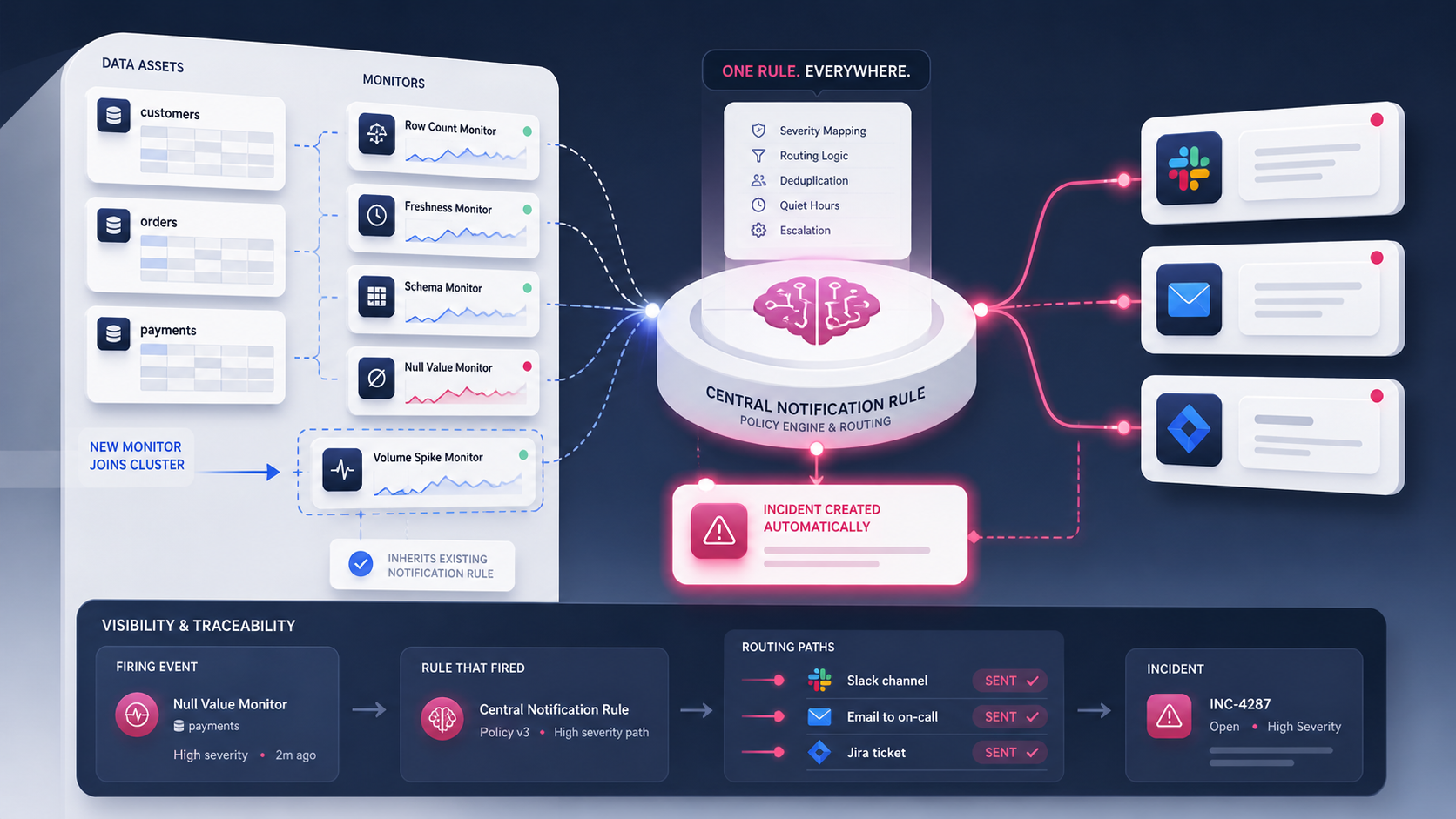
Notification rules in Sifflet are reusable alerting policies that route monitor failures to the right destinations across many assets at once. Each rule answers two questions: what triggers an alert (which monitors or assets match) and where the alert is delivered (Slack, email, Jira, or a webhook).
Until this update, every monitor in Sifflet carried its own notification configuration. That worked when a team had ten monitors. It collapses when the same team has eight hundred. Notification rules replace per-monitor settings with a centralized system that mirrors how the business is actually organized — by domain, by data product, by team.
How notification rules work
Each rule has two halves: a matching condition and an action set. When a monitor fails and matches the condition, Sifflet executes the action.
- Matching condition: assets, domains, monitor types, tags — composable however the team needs.
- Action set: the channels and templates used to deliver the alert.
- Inheritance: any new monitor that matches an existing rule picks it up automatically. No setup required.
- Override: any individual monitor can opt out of inherited behavior or layer in additional recipients for edge cases.
Automatic incident creation closes the gap
When a monitor fails and matches a notification rule, Sifflet creates a corresponding incident by default. Every routed alert now has a tracked incident with full lineage, history, owner, and resolution context attached.
This default closes the most common gap in data observability workflows — the moment between alert and triage. Operators no longer need to manually open an incident after seeing a Slack message; the workflow is connected from the start. The Slack alert links to the incident, the incident links to the failing asset, the asset links to its lineage. One paged engineer, three clicks, full picture.
Visibility in Monitor and Incident overviews
Applied notification rules now appear directly inside the Monitor Overview and Incident Overview pages. Operators can see which rule fired, which channels were notified, and who owns the response — all in one view.
This visibility matters most during on-call rotations. When an alert lands at 3 a.m., the responder can trace exactly which rule triggered it and why, without piecing together monitor-level configuration from memory.
A real example: routing payment monitors to finance
Consider Susie, a senior data engineer at a payments company. She manages a Sales domain with dozens of monitors on payment_transactions, invoices, and refunds. Before notification rules, every new monitor required Susie to manually wire up Slack, email, and Jira destinations — a tedious, error-prone task that she frequently postponed.
With notification rules, Susie creates one rule that targets the entire payment table family, scoped to Freshness and Volume monitors. The rule routes alerts to:
- The #finance-alerts Slack channel
- The finance-ops@company distribution list
- Jira, using the FINOPS ticket template her team already maintains
When a new payment-related monitor is added next quarter, no notification setup is required. The rule applies automatically. Susie spends her time investigating real failures instead of configuring alert plumbing.
Why centralized rules matter at scale
Per-monitor alert configuration breaks down quickly. A platform with 500 monitors accumulates 500 fragmented configurations, drift between similar assets, and inconsistent escalation paths. Onboarding a new data engineer means walking them through ad-hoc setup choices made over years.
Centralized rules solve three problems at once.
ProblemWithout rulesWith notification rulesSetup effortConfigured per monitor, every timeConfigured once per patternConsistencyDrifts as the monitor catalog growsInherited automaticallyVisibilityScattered across hundreds of monitorsSurfaced in Monitor and Incident overviews
Where notification rules fit in your stack
Notification rules sit at the intersection of monitoring and incident management. They turn raw failure signals into routed, owned, actionable incidents — the same way a well-configured PagerDuty escalation policy turns alerts into rotations.
If your team already uses Slack as the central nervous system for engineering, or Jira as the system of record for tickets, notification rules slot into that existing architecture without forcing a workflow change. The integration handles the routing; your team handles the response.
Getting started
Notification rules are available now to all Sifflet customers. Existing monitor-level notifications continue to work, so teams can migrate gradually rather than all at once. Start by identifying one high-volume domain — payments, customer data, marketing attribution — and replacing its per-monitor configurations with a single rule. Measure the change in alert noise after one week.
The Sifflet documentation walks through rule creation, matching syntax, and override behavior in detail. For teams running data observability at scale, centralized notification rules turn alerting from a per-monitor chore into a managed, observable system — exactly like the rest of the data stack should be.
.avif)
















-p-500.png)
