



If you haven't had a glance at data catalogs lately, you might have missed their latest evolution.
They moved from static phonebook to self-service data discovery platform to active metadata-inspired intelligence system, seemingly overnight.
By early 2026, most data catalogs have either completely remade themselves or been gobbled up and integrated into someone else's vertical.
That leaves every enterprise looking at data catalogs with a less-than-straightforward question:
Do we need a data catalog? And if so, which one?
For the best answer, let's start with the basics.
What is a Data Catalog?
A data catalog is a metadata management platform that centralizes and makes searchable the inventory of available data assets for technical and business users to discover, access, and understand.
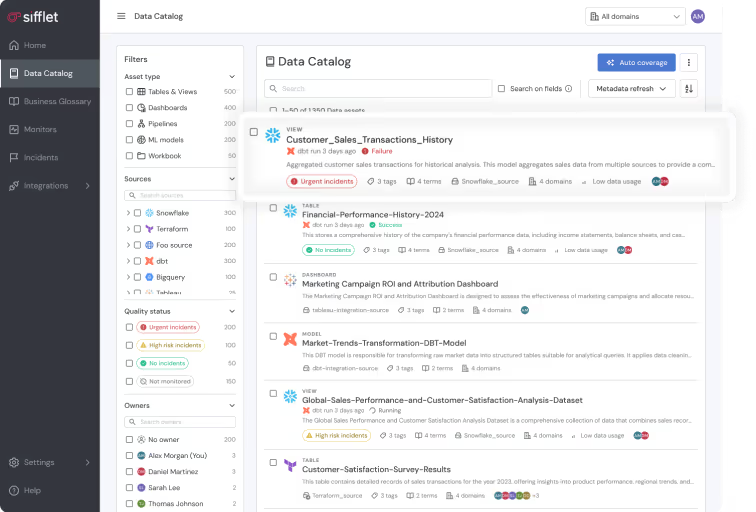
Having evolved from simple lists and tables into an active orchestration layer, data catalogs now offer:
- Self-service search and discovery: A user interface to locate tables, files, dashboards, and code from available data assets
- Metadata and business context to establish who is responsible for the data, frequency and use of datasets, quality, and freshness.
- Data lineage: From source, through transformations, to destination
- Governance and security: Access controls and sensitivity labels embedded in metadata
Why the Right Data Catalog Matters
Choosing the best data catalog for your enterprise certainly includes matching features to use cases. But user adoption is just as pivotal. Many companies have invested heavily in a data catalog only to find users won't or can't use it.
These are the top 3 reasons data catalogs go unused:
1. The Trust Gap
If a data catalog requires any manual efforts or updates, it's practically doomed from the start.
The moment business users find stale descriptions or broken links, trust quickly evaporates. And once trust is gone, everyone returns to their previous, inefficient ways of seeking out the data they need.
Prioritize tools that crawl and harvest metadata frequently, if not in real-time.
2. The Technical Barrier
Catalogs should simplify data discovery, not complicate it. If finding a simple dataset requires business users to learn code or memorize technical terms, forget it. They're not going to do that.
Look for natural language (NLP) search and an intuitive, business-friendly interface.
3. The Context Switching Cost
People naturally resist change, but if a data catalog won't fit within regular workflows, it will go unused. For a catalog to be adopted, it must live where the work happens.
Choose a catalog that integrates directly into workflows, Slack, and other high-use tools.
Selecting a data catalog should include strong consideration of your team's technical maturity, use cases, and stack size.
Comparing Data Catalogs: Which Type Is Right for You?
The perfect data catalog is the one that eliminates data silos and is quickly adopted by your team to find and use data assets. But depending on your priorities for automation, customization, and cost, you’ll find solutions within one of three primary categories:
1. Open Source Data Catalogs
You have a highly specialized data stack and an engineering team that prefers building rather than buying. You need a platform that you can customize at the source-code level and host internally to maintain complete control over your metadata.
Examples: DataHub, OpenMetadata, Apache Atlas
Best for enterprises with highly specialized architectural needs and mature engineering teams
🟢 Pros: Total customization, no licensing fees, and an API-first approach that developers love
🔴 Cons: High total cost of ownership due to engineering hours required for deployment, hosting, and ongoing maintenance
2. Enterprise Data Catalogs
The enterprise is scaling rapidly and demands self-service data discovery. Still, technical teams demand customization, but non-technical users require an intuitive interface to spur adoption.
Examples: Alation, Collibra, DataGalaxy
Best for: Fast scaling companies and large enterprises needing out-of-the-box performance
🟢 Pros: AI-powered automation, native lineage across multiple clouds, and dedicated support
🔴 Cons: Significant upfront licensing costs; too much tool for very small teams
3. Cloud-Native / Platform Catalogs
Your enterprise operates almost entirely within a single cloud ecosystem and needs to index technical metadata.
Examples: AWS Glue Data Catalog, Google Dataplex, Microsoft Purview, Databricks Unity Catalog
Best for: Organizations committed to a single cloud ecosystem
🟢 Pros: Seamless integration with existing cloud services (e.g., AWS Athena or Google BigQuery) and often bundled into existing cloud costs
🔴 Cons: Often lack deep business context and struggle to provide a single view if your data is spread across multiple clouds and on-premise servers
Choosing a catalog type is only the first step. The true test of a data catalog is how well its feature set aligns with your actual data volume and your team's technical maturity.
Match Features to Your Needs
Avoid over-engineering or under-powering your data catalog solution. Match feature requirements to the your enterprise's current and near-term scale and objectives.
For Growth-Stage Companies (Low to Mid Volume)
Your data team is small, and the primary goal is to enable self-service data discovery.
- Search & Discovery
A powerful search bar that understands natural language and synonyms (e.g., searching "Sales" also brings up "Transactions").
- Basic Metadata
Automated ingestion of schema definitions, table descriptions, and ownership tags so users know exactly who is responsible for which dataset.
- Social Collaboration
Features like ratings, likes, or discussions that allow the community to document tribal knowledge in real-time.
- Easy Connectors
High-quality, plug-and-play integrations for the modern data stack (e.g., Snowflake, BigQuery, Tableau, and dbt).
For Mature Enterprises (High Volume & Complexity)
You've reached a point where manual documentation is no longer feasible. With thousands of tables spread across multiple clouds and legacy systems, the challenge is managing complexity and mitigating risk. A data catalog must serve as an intelligence layer.
- Automated Lineage
The ability to trace data upstream and downstream.
The catalog moves from passive to proactive—triggering actions such as alerting a Data Engineer in Slack when a source table is stale or automatically masking sensitive columns.
- Programmatic Governance
Automated PII (Personally Identifiable Information) discovery that uses machine learning to find and tag sensitive data across thousands of tables.
- Data Contract Management
Tools to define and enforce agreements between data producers and consumers.
The Must-Have: Data Governance
Regardless of size, governance should have a home in your data catalog.
- Glossary: Standardizing definitions.
- Stewardship: Assigning Data Stewards accountable for the quality, documentation, and lifecycle of specific datasets.
- Quality Indicators: Integrating with observability tools to show "Health Scores" or "Freshness" badges directly next to datasets.
- Certification Workflows: A formal process for marking specific datasets as Certified or Gold Standard, to give business users confidence for board-level reporting.
The final piece of the puzzle is the selection process.
5 Steps to Choose Your Data Catalog
Choosing a data catalog is a high-stakes decision. If you choose a tool that is too complex for your team to use, it’s quickly relegated to shelfware. Follow this approach to evaluating vendors and securing long-term architectural fit.
Step 1. Inventory Your Stack
Before assessing features, determine whether the data catalogs you’re considering offer native integrations or will require custom-built API connectors. The more custom connections you have, the longer you’ll spend in development purgatory.
List every tool you use: From ingestion to storage to transformation and BI.
The 90% Rule: Look for tools with native connectors to reap immediate value.
Check Metadata Depth: Make sure pull table names, column descriptions, SQL logs, and user activity metadata are captured.
Step 2. Identify the Primary User
You can't build a tool for everyone all at once.
Define the Intended User: Data Engineers want API access and automation. Business Analysts want a clean UI and a business glossary.
Adoption Metrics: Select the tool that best matches the technical literacy of the team most likely to use it.
Agent-Readiness: Is the metadata machine-readable? If an AI agent can't understand the business context from your metadata, it can't incorporate it into its autonomous processes.
Step 3. Prioritize Automation over Features
Feature lists can be deceptive. A vendor may claim to have 50 governance modules, but if they require manual entry of descriptions, they'll never be used.
Look for AI-Tagging: Can the tool suggest "Owners" or "PII" labels based on the data it sees?
Auto-Lineage: Does the tool build the data map itself by reading your SQL logs, or do you have to draw it?
Step 4. Run a Proof Of Concept with Dark Data
Sales demos usually occur in clean environments. To determine if a catalog actually works with your environment, test it against your dark data—the messy, undocumented, legacy tables that currently confuse your team. If the tool can't bring clarity to your mess, it's probably not the right tool.
The 10-Minute Test: During your trial, try to find a currently undocumented dataset. If the tool can't help you understand its context and origin within 10 minutes, move on.
Stress-Test Lineage: Pick your most complex dashboard and test whether the tool can trace it back to the raw source table.
The Layman Test: Have a non-technical user try to find a specific metric without any training.
Step 5. Evaluate its Metadata Capabilities
The most significant shift in catalog tech was the move from passive to active metadata.
Bidirectional Sync: Does the data catalog send metadata back to your other tools, such as showing a quality warning directly in a Tableau dashboard or in a dbt run?
Slack/Teams Integration: Can users search the catalog or receive alerts directly within their communication apps?
While enterprise giants focus on active metadata to improve search and governance, observability platforms like Sifflet Data Observability also leverage it to improve operational health.
Sifflet's Data Catalog
Finding data is only half the battle. The real challenge is knowing if that data is reliable before it's used in a production dashboard or for strategic decision-making.
Sifflet’s data catalog merges data observability with metadata management, so that when a user finds an asset, they see its business context and health in a single view.
Consolidating discovery, lineage, and observability, Sifflet turns your metadata into a proactive reliability engine so that every asset is not just findable, but board-ready and trusted by the entire enterprise.
Depending on your needs, these are the Sifflet features that will have the largest impact.
1. When Data Trust is Your Primary Bottleneck
You have enough data, but not enough trust. Your Slack channels are filled with users asking, "Is this dashboard right?" or "Why are these numbers different?"
- Integrated Health Status: Sifflet automatically displays an asset's quality status directly in the search results.
- Unified Context: Users see business definitions alongside real-time reliability metrics, eliminating the guessing game across tools.
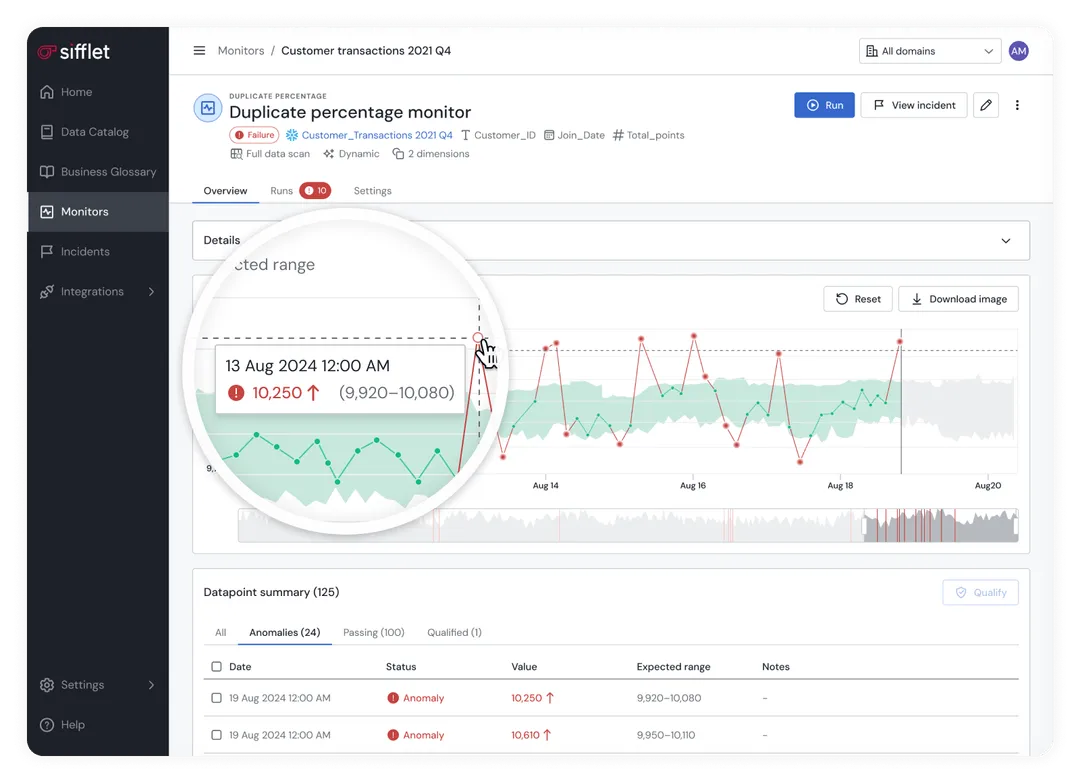
- Built-in Monitoring: Unlike other catalogs, Sifflet monitors for data freshness, accuracy, and schema changes right out of the box.
2. When You Need Automated, Incident-Aware Lineage
Your data environment is a complex web of ingestion, transformations, and BI tools.
- End-to-End Visibility: Sifflet automatically maps data's journey from ingestion through the warehouse and transformation layers to the final destination.
- Live Impact Analysis: Lineage identifies unhealthy nodes in real time, enabling up to 70% faster root-cause analysis during incidents.
- Field-Level Traceability: Trace issues down to specific columns to understand exactly how a transformation error affected a high-level KPI.
3. When You Want One Tool for Discovery, Trust, and Observability
You're a fast-growing team and want to avoid buying one tool for discovery, another for governance, and a third for observability.
- Consolidated Platform: Sifflet merges metadata management with deep observability, reducing the number of tabs your team needs to manage their daily work.
- AI-Native Enrichment: Sifflet's proprietary AI agents automatically discover assets, suggest documentation, and recommend monitoring thresholds, reducing manual upkeep.
- Self-Service Discovery: An intuitive, Google-like search interface allows non-technical users to find "Net Revenue" or "Churn Rate" without writing SQL or asking an engineer.
Sifflet is a reliability engine. While other catalogs help you find the data, Sifflet gives your team the confidence to actually use it by connecting technical data health directly to business outcomes.
Ready to turn your metadata into a competitive advantage? Book a demo today.












-p-500.png)
