




Meta Description:
Your analyst is looking for a dataset.
She searched spreadsheets, checked on Slack, and asked three different teams for help. But forty minutes later, she still can’t find one.
Now multiply this times five times a day, and you have a real problem. Issues aren’t solved in time because analysts can’t track datasets down, and this ripples all the way down to business decisions.
You need a metadata tagging strategy.
What is Metadata Tagging?
First, metadata is data about data. It answers questions like "What is this dataset?", "Who owns it?", and "When was it last updated?"
Metadata tagging takes this a step further. It organizes metadata by systematically labeling each dataset with details about ownership, business purpose, sensitivity, freshness, and other key characteristics.
In the past, data users relied on READMEs and spreadsheets to describe and find relevant data assets. Both methods were inconsistent, however, with READMEs varying in detail, and spreadsheets often incomplete or outdated.
Fortunately, modern data catalogs address this through automated metadata tagging. These tools discover and label datasets automatically, using a consistent format and regularly updating available datasets.
Metadata tagging delivers four elements that data users need in one consistent format:
- Discovery: Finding the right data faster
- Governance: Enforcing standards across your organization
- Quality Tracking: Knowing which assets you can trust
- Compliance: Preserving audit trails and other regulatory requirements
Together, these make data searchable, traceable, and observable across your entire stack.
Different roles use metadata differently. Data teams need lineage and ownership clarity. Business teams need fast discovery and trust signals. Compliance teams need audit trails.
A successful strategy connects all three perspectives.
A successful metadata tagging strategy must connect each perspective by linking lineage, business context, and compliance into one unified framework.
How to Create a Metadata Indexing Strategy
Building a metadata tagging strategy doesn't take months of planning, just clarity on five essential points: governance, standards, business context, lineage, and automation.
Let's walk through each.
Step 1: Define Governance and Responsibility
The first question isn't "What should we tag?"
It's "Who decides?"
Designate a single authority over metadata tagging. Without it, one team might tag by data owner, another by business domain, and a third not at all. That's how standards decay.
Establish governance and responsibility first.
Governance committees are a natural fit for standard setting. Charge them with defining metadata and tagging standards for the entire enterprise.
Armed with clear policies and standards, data engineering or platform teams can then implement the standards technically.
Once deployed, data stewards make sure metadata tagging remains accurate and consistent.
A simple RACI matrix clarifies these roles: one body sets policy, one implements it, and a third maintains it.
Step 2: Establish Metadata Tagging Standards and Schema
This answers the question: “What are data stewards responsible for?”
Start with what to tag: asset ownership, data quality level, sensitivity (is this PII?), business domain, update frequency, and monitoring status. You're setting naming conventions, determining which tags are mandatory versus optional, and defining tag hierarchies.
You have several structural options:
- Keywords: free-form tags anyone can create
- Taxonomy: structured hierarchies
- Controlled vocabulary: a finite list of approved terms
- Hybrid: controlled vocabulary for critical assets, free-form for flexibility
Critical datasets are tagged using a controlled vocabulary, terms like Revenue, Customer, or Order, so everyone applies the same definitions.
Less critical or exploratory datasets use flexible, free-form tags that make discovery easier without the overhead of strict governance.
Keep your standards short and visible. A one-page cheat sheet beats a 50-page policy no one reads.
Example: PII = names, emails, phone numbers, SSNs.
Publish it, and point to it from everywhere. That's how standards take root.
Step 3: Build Your Business Glossary
Different departments often interpret common terms in their own way, shaped by their specific priorities and context. Finance focuses on reporting accuracy. Product focuses on adoption. Marketing focuses on growth.
Take "revenue," for example. Finance might include refunds in its calculation. The product team might not. Marketing might count beta sales or promotional offers.
Each version holds significance within its domain, but generates conflicting metrics across the enterprise. That confuses users and distorts dashboards, ultimately undermining confidence in the data.
A business glossary resolves that friction by establishing shared definitions. It clarifies data, so "revenue" means the same across every report, product, and conversation.
Domains may still use scoped variations such as Finance Revenue or Product Revenue to represent legitimate differences in calculation. Still, the governance committee should clearly define and maintain those apart from the primary definition.
Start with 20–30 terms that matter most to your organization's reporting and decision-making, and expand over time. Link glossary terms directly to data assets so an analyst searching "revenue" sees the official definition, which datasets execute it, and how they differ.
Ownership matters here, too. Business stakeholders define the terms, and data stewards map them to technical assets. Both are essential to keep business meaning and technical implementation aligned.
Step 4: Define Data Lineage and Column-Level Mapping
Data lineage illustrates where data comes from, how it's transformed, and where it goes. This visibility builds trust and shortens incident response.
Without it, you can't see how a change upstream affects dashboards downstream or explain where a number came from.
Data mapping adds precision to that picture. It connects individual columns and fields between systems, showing exactly how Customer_ID in one table becomes Client_ID in another, or how Revenue calculates from multiple inputs.
Mapping gives lineage its depth. It's what turns high-level flows into actionable insight for debugging, migrations, and audits.
Lineage and mapping allow you to trace every metric back to its origin.
Unfortunately, manual mapping is slow, error-prone, and impossible to scale beyond a few hundred assets. Use a data catalog or observability tool to auto-detect lineage and column-level mapping from SQL, pipelines, orchestration, and BI platforms.
Start with your most critical dashboards and KPIs. Trace each number to its source, document transformations, and record dependencies.
When something breaks, lineage and mapping should reveal which assets are affected, who owns them, and what changed.
Lineage and mapping turn root-cause analysis from guesswork into a quick, directed response.
Image
Step 5: Automate Metadata Tagging and Maintenance Cycles
Manual tagging doesn't scale, just like using READMEs and spreadsheets to label data assets.
To make your metadata strategy more scalable and productive, automate where possible.
For example, automate classification, freshness checks, quality scoring, PII detection, and duplicate identification.
Let your tools handle anything that can be systematically identified and labeled. Save human effort for the work that requires judgment. AKA writing business glossary terms, resolving domain-specific questions, and addressing governance decisions.
Schedule quarterly audits to confirm that tagging standards are still applied and that tags remain relevant as business needs evolve.
Lastly, don’t forget to prioritize the opinion that matters: user feedback.
When an analyst can't find the right dataset, take that as a signal. Observe how people search and discover data. Refine your tagging and catalog structure based on those patterns, replacing outdated or incorrect assumptions.
Automation and feedback keep your metadata strategy current, responsive, and adaptive.
With your strategy in place, the next step is execution. Since most companies can't manually maintain this process at scale, they use platforms like Sifflet to automate, unify, and extend metadata tagging.
How to Tag Metadata with Sifflet
You've defined your governance model, your standards, and your glossary. Now it's time to put it into practice.
Sifflet takes your work and employs automation, AI enrichment, and unified discovery to bring your metadata tagging strategy to life.
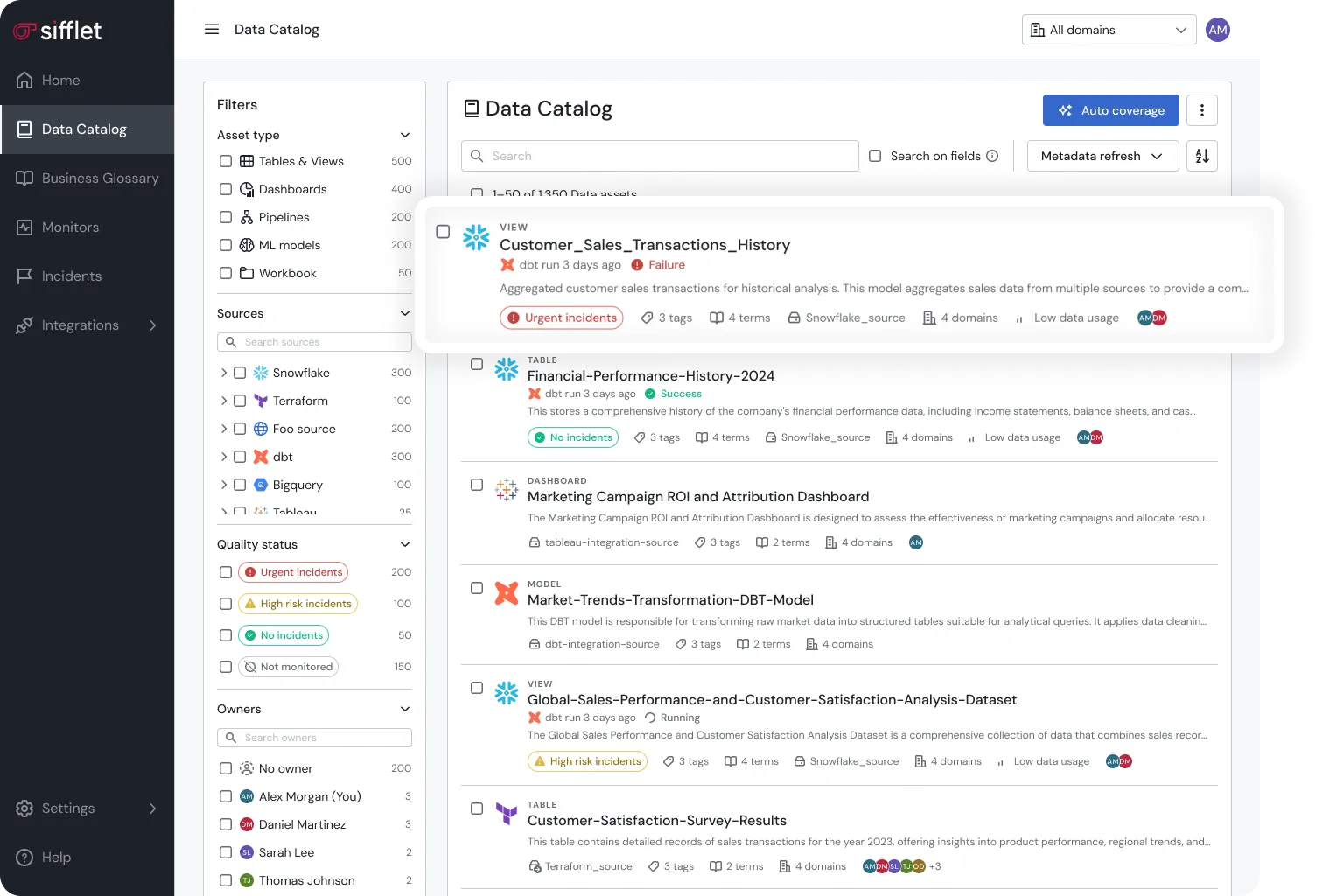
What Does Sifflet Deliver for Metadata Tagging?
Sifflet starts where your data already lives.
The platform collects metadata from across your stack, including Snowflake, BigQuery, Databricks, dbt, and more. This groundwork powers Sifflet's automation.
Sifflet centralizes everything within its data catalog, bringing warehouse tags, pipeline descriptions, dbt column comments, and BI documentation into one connected view.
You can also bulk-import metadata from external catalogs or spreadsheets using a simple CSV template, consolidating everything into a single source of truth.
AI-assisted enrichment handles the repetitive work.
Sifflet’s Metadata Tagging Automations
Based on content analysis, Sifflet auto-generates descriptions at both asset and field levels, detects PII, and recommends classification tags at the field level.
You can review, edit, or dismiss these suggestions before applying them to keep metadata accurate and reliable.
Field-level lineage shows exactly which columns feed into reports and dashboards and where they drive business outcomes. When a column changes, you see which downstream assets are affected and their consequences.
Trust scores appear on every asset: in data catalogs, lineage graphs, monitoring dashboards, and BI tools. Every decision point carries a clear reliability rating, so users know when to trust their data before using it in production and analysis.
Manual curation adds human depth to automation. Data stewards and domain experts enrich assets with business glossary terms, standardized tags, and business context.
Sifflet combines automation with human judgment to create a living metadata system that adapts as your data evolves.
How to Get Started with Metadata Tagging with Sifflet
This can be done in only 5 steps.
Step 1: Connect Your Data Sources
Use native connectors to your data warehouses, transformation frameworks, and BI tools.
Authentication is straightforward and code-free. Most connections take 15–30 minutes per source.
Step 2: Automatic Tag and Metadata Collection
Sifflet automatically discovers and imports existing tags, labels, and schema metadata, so no manual setup is required.
Once connected, ingestion begins immediately and completes within hours, giving you a complete view of existing documentation.
You can also bulk-import metadata such as descriptions, classifications, and custom tags from external catalogs or spreadsheets using Sifflet's CSV template to unify legacy documentation quickly.
Step 3: Enrich with Business Context
Add business glossary terms and custom tags that reflect your governance framework. Write descriptions that explain both business purpose and technical structure.
Link assets to the business outcomes and dashboards they support to make dependencies and context completely visible.
Step 4: Configure Quality and Lineage Monitoring
Activate lineage tracking to visualize dependencies and perform impact analysis.
Then configure freshness, volume, and quality checks for critical assets in line with the governance roles and responsibilities you established in your tagging strategy.
Sifflet tracks data as it moves through your stack, creating a living record of its lifecycle and giving teams continuous visibility into dependencies, quality, and impact.

Step 5: Enable Discovery and Validate
Users can search for data by tags, lineage, and business-impact filters to find what they need faster and understand the context behind each asset.
Track how those assets are used: which datasets are used most often, how quickly analysts discover them, and how frequently quality metrics are verified before analysis.
Use these insights to refine your tagging and catalog structure to make discovery faster, easier, and more reliable for every data consumer.
Is Metadata Tagging Really Necessary?
Metadata tagging is how data becomes visible, actionable, and credible.
Without it, data disappears. Analysts waste hours searching for data, while each domain rebuilds what already exists.
Metadata tagging changes that.
It makes data searchable, reliable, and accountable, so people can spend less time finding information and more time using it.
The key is scale. Manual tagging can't keep pace with modern data velocity.
With tools like Sifflet, your platform automatically discovers assets, enriches them with AI, and connects them to lineage, quality, and trust.
Start today with Sifflet, and give every team instant visibility into lineage, quality, and trust.













-p-500.png)
